Intentional Releases
From Deployment Chaos to Reliable Delivery
Release Management and Database Migrations
Agenda
- Part 1: Release Management - From chaos to intentional releases (10 min)
- Part 2: Demystifying Database Migrations - Why rollbacks fail (15 min)
- Part 3: CI/CD & GitOps - Modern deployment strategies (25 min)
- Q&A (10 min)
Part 1
Release Management
The Problem We're Solving
- What's actually running in production right now?
- Can we safely roll back this deployment?
- What database changes went out with this release?
Our Current CI/CD Pipelines
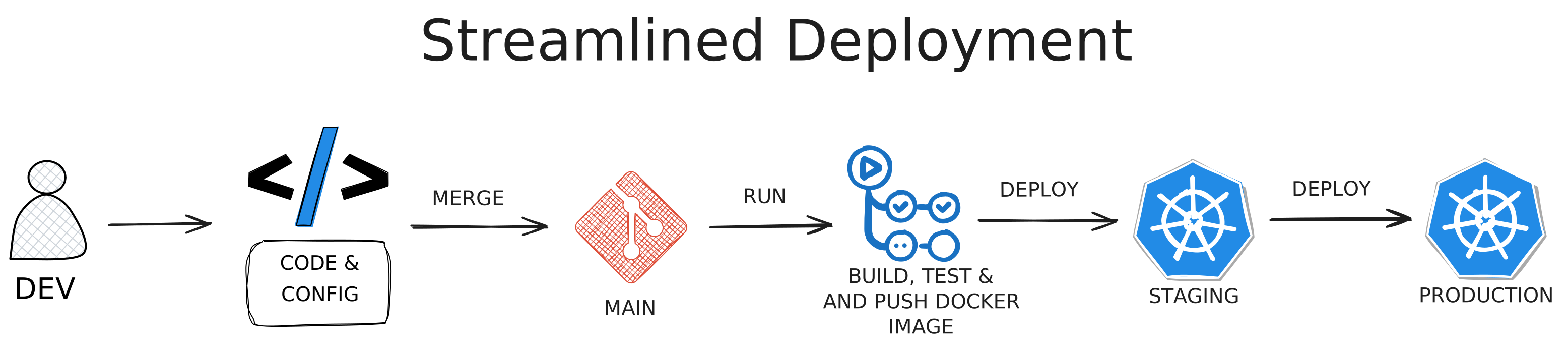
Our Current CI/CD Pipelines
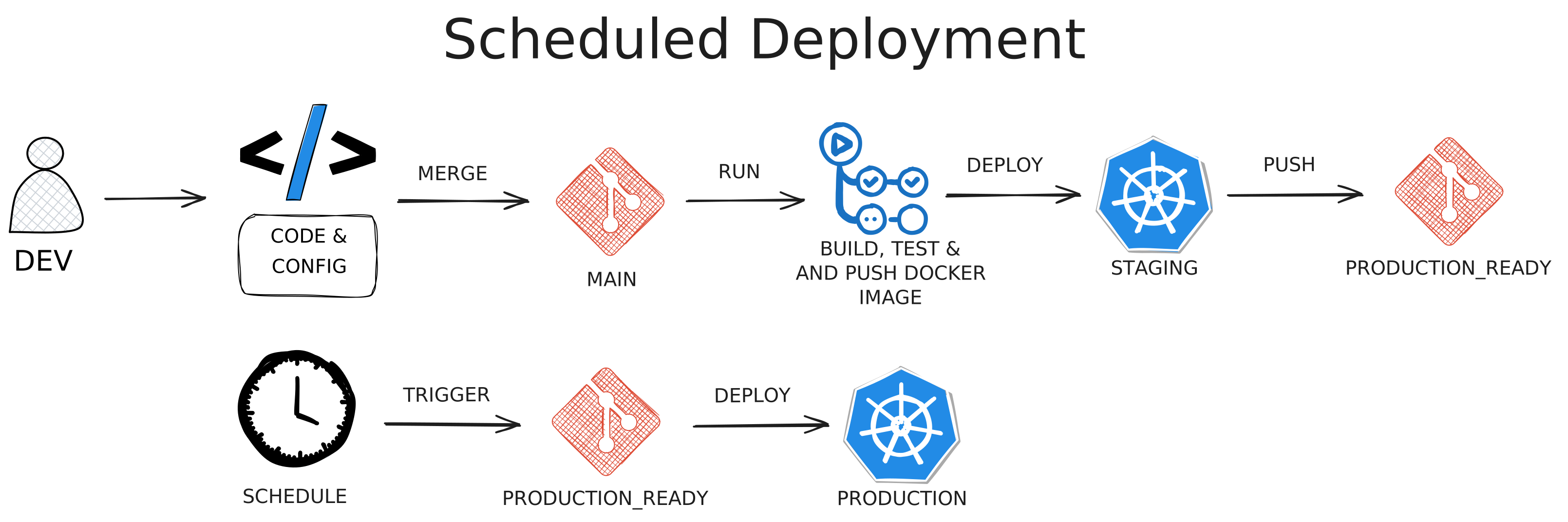
Critical Problems
1. Blind Deployments
- Low visibility into what's being deployed
- Difficult to correlate issues with changes
Critical Problems
1. Blind Deployments
- Low visibility into what's being deployed
- Difficult to correlate issues with changes
2. Database Migration Risks
- No assessment before deployment
- Unknown whether migrations can be rolled back
Critical Problems
2. Database Migration Risks
- No assessment before deployment
- Unknown whether migrations can be rolled back
3. Staging Doesn't Validate Functionality
- Staging only verifies deployment succeeds mechanically
- Production is the first place we discover functional issues
Critical Problems
3. Staging Doesn't Validate Functionality
- Staging only verifies deployment succeeds mechanically
- Production is the first place we discover functional issues
4. Impossible Rollbacks
- Database state unknown
- Previous code doesn't have down migrations for newer changes
(We'll explain why in Part 2)
The Solution - Intentional Releases
Core Principle: Deploy from Tags, Not Commits
❌ Old Way
Deploy whatever accumulated on main
✅ New Way
Create tagged releases (v1.2.3)
The Solution - Intentional Releases
Core Principle: Deploy from Tags, Not Commits
Benefits:
- Intentional deployment decisions
- Curated set of changes
- No accidental commit combinations
- Clear documentation of what's in each release
Semantic Versioning for Risk
PATCH (v1.2.3 → v1.2.4) - Zero Risk
- Bug fixes only
- NO database changes
- Safe to deploy and roll back (code only, no schema change)
Semantic Versioning for Risk
MINOR (v1.2.4 → v1.3.0) - Low Risk ⚠️
- New features
- Additive-only DB changes (new tables, columns)
- Code rollback fine; schema rollback loses new data
Semantic Versioning for Risk
MAJOR (v1.3.0 → v2.0.0) - High Risk 🚨
- Breaking API changes
- Database modifications or deletions
- Schema rollback requires planning, or is impossible
Comprehensive Release Documentation
						Release: v2.1.0
						Type: MINOR

						Changelog:
						  Features:
						    - "[#123] Add user email preferences"
						    - "[#456] Support bulk export from dashboard"
						  Fixes:
						    - "[#789] Fix password validation edge case"

						Database Changes:
						  Migrations:
						    - "Added user_preferences table"
						    - "Added email_verified column to users (nullable)"
						  Risk Level: LOW (additive only)
						  Rollback Impact: "New data would be lost"

						API Changes:
						  New Endpoints:
						    - "POST /api/user/preferences"
						  Breaking Changes: None

						Service Dependencies:
						  Requires: "frontend >= v2.1.0"
						  Compatible With: "All existing API consumers"

						Rollback Strategy:
						  Code: "Safe to roll back to v2.0.x"
						  Database: "New tables/columns left in place"
						  Data Impact: "User preferences would be orphaned"
Part 2
Demystifying Database Migrations
The Traditional Migration Myth
The Promise:
- Every
uphas adown - Run
downto rollback - Simple, reversible, safe
The Assumption:
- Database is unchanged between up and down
- Production stands still while you rollback
- Data written after migration can be deleted safely
The Traditional Migration Myth
The Promise:
- Every
uphas adown - Run
downto rollback - Simple, reversible, safe
The Assumption:
- Database is unchanged between up and down
- Production stands still while you rollback
- Data written after migration can be deleted safely
The Reality:
✅ Works in development
❌ Fails in production
Why Down Migrations Fail in Production
Reason #1: You Can't Unwrite Data
		-- up: Add column
		ALTER TABLE users ADD COLUMN preferences JSONB;
		-- down: Remove column
		ALTER TABLE users DROP COLUMN preferences;
After deployment, users write data. Rollback = permanent data loss.
Why Down Migrations Fail in Production
Reason #2: Application State Mismatch
v2.0 adds enum values ("paused", "archived")
Production runs for 2 hours, creates records
Rollback to v1.5 → v1.5 doesn't understand these values
Why Down Migrations Fail in Production
Reason #3: Failed Migrations Create Unknown States
		Step 1: ALTER TABLE users ADD COLUMN email_verified BOOLEAN;   ✓
		Step 2: UPDATE users SET email_verified = FALSE;               ✓
		Step 3: ALTER TABLE ... SET NOT NULL;                          ✗
		Step 4: CREATE INDEX ... (never runs)
Down migration assumes full completion → creates more problems
Why Down Migrations Fail in Production
Reason #4: Previous Code Doesn't Have Down Migrations
- Deploy v2.0 with new migration
- Problem emerges, need to rollback
- Rollback to v1.5 — but v1.5 doesn't contain v2.0's migration file
- Must manually run
downfirst, then deploy old code
Production Reality Check
In Development:
- ✓ Empty database with test data
- ✓ Only you are using it
- ✓ Can delete and start over
- ✓ Down migrations work fine
Production Reality Check
In Development:
- ✓ Empty database with test data
- ✓ Only you are using it
- ✓ Can delete and start over
- ✓ Down migrations work fine
In Production:
- ✗ Customers create real data immediately after migration
- ✗ That data has business value
- ✗ Down migration = deleting customer data
- ✗ Can't rollback without data loss
The Real Strategy - Roll Forward
Accept Current Reality:
- The schema only rolls forward in production
- Down migrations useful in development only
- The code can still roll back; the schema cannot
The Real Strategy - Roll Forward
New Approach:
- Make changes in small, safe steps
- Each step backward compatible
- Roll forward instead of back
- Use application code for compatibility during transition
The Real Strategy - Roll Forward
New Approach:
- Make changes in small, safe steps
- Each step backward compatible
- Roll forward instead of back
- Use application code for compatibility during transition
The Expand-Contract Pattern
Core Idea:
Make breaking changes through backward-compatible steps
Expand
Add new schema, dual-write, read from oldBackfill
Populate new schema with existing dataSwitch Reads
Read from new, keep dual-writeStop Old Writes
Write only to new schemaContract
Remove old schemaEach step is independently deployable and code-rollback-safe
Real Example - Splitting a Column
Starting Point:
users table: full_name VARCHAR(255) -- "First Last"
Phase 1: Expand (v2.1.0 - MINOR)
									ALTER TABLE users ADD COLUMN first_name VARCHAR(100);
									ALTER TABLE users ADD COLUMN last_name VARCHAR(100);
Add new columns, dual-write to both, continue reading from old
All phases are MINOR (additive) until final DROP (MAJOR)
Real Example - Splitting a Column
Phase 1: Expand - Dual-Write Code
Application keeps both columns synchronized:
- If
full_namechanges → split and write tofirst_name/last_name - If
first_name/last_namechange → combine tofull_name - All writes update both formats
Real Example - Splitting a Column
Phase 1: Expand - Implementation
									class User < ApplicationRecord
										before_save :sync_name_fields

										def sync_name_fields
											# Write to both old and new columns
											if will_save_change_to_full_name?
												parts = full_name.to_s.split(' ', 2)
												self.first_name = parts[0] || ''
												self.last_name = parts[1] || ''
											elsif will_save_change_to_first_name? || will_save_change_to_last_name?
												self.full_name = "#{first_name} #{last_name}".strip
											end
										end
									end
Reads prioritize new fields with fallback to old
Real Example - Splitting a Column
Phase 2: Backfill (background job)
									UPDATE users
									SET
										first_name = SPLIT_PART(full_name, ' ', 1),
										last_name = COALESCE(NULLIF(SPLIT_PART(full_name, ' ', 2), ''), '')
									WHERE
										full_name IS NOT NULL
										AND (first_name IS NULL OR last_name IS NULL);
- Run as background job (not in migration)
- Process in batches | Can take hours/days
- Application handles missing data gracefully
Real Example - Splitting a Column
Phase 3: Switch Reads (v2.3.0 - MINOR)
									# Code now READS from first_name/last_name
									# But still WRITES to both (dual-write continues)
									def full_name
									  "#{first_name} #{last_name}".strip
									end
Real Example - Splitting a Column
Phase 4: Stop Old Writes (v2.4.0 - MINOR)
									class User < ApplicationRecord
										# sync_name_fields callback REMOVED
										# full_name column is now ignored (becomes stale)

										# All writes go exclusively to new columns
										def update_name(first, last)
											update!(first_name: first, last_name: last)
											# full_name is NOT updated anymore
										end
									end
- Remove the
sync_name_fieldscallback from Phase 1 - Writes go exclusively to
first_name/last_name full_namebecomes stale — safe to drop in next phase
Real Example - Splitting a Column
Phase 5: Contract - Drop Old Column (v3.0.0 - MAJOR)
ALTER TABLE users DROP COLUMN full_name;
Ensure new code works before removing safety net
Real Example - Splitting a Column
Expand-Contract
Benefits & When to Use
Benefits:
- Zero-downtime deployments
- Each step independently safe
- Clear code-rollback points
- No data loss risk
- Can pause at any phase
Trade-offs:
- More deployments required
- Temporary complexity
- Temporary storage overhead
Expand-Contract
Benefits & When to Use
Benefits:
- Zero-downtime deployments
- Each step independently safe
- Clear code-rollback points
- No data loss risk
- Can pause at any phase
Trade-offs:
- More deployments required
- Temporary complexity
- Temporary storage overhead
When to Use:
- Column rename/split/merge
- Type changes
- Constraint changes
- New tables
- New columns
- Purely additive
Expand-Contract
Benefits & When to Use
Decision:
Breaking change? → Expand-Contract
Additive only? → Traditional
Part 3
CI/CD & GitOps
Traditional CI/CD
The Push Model
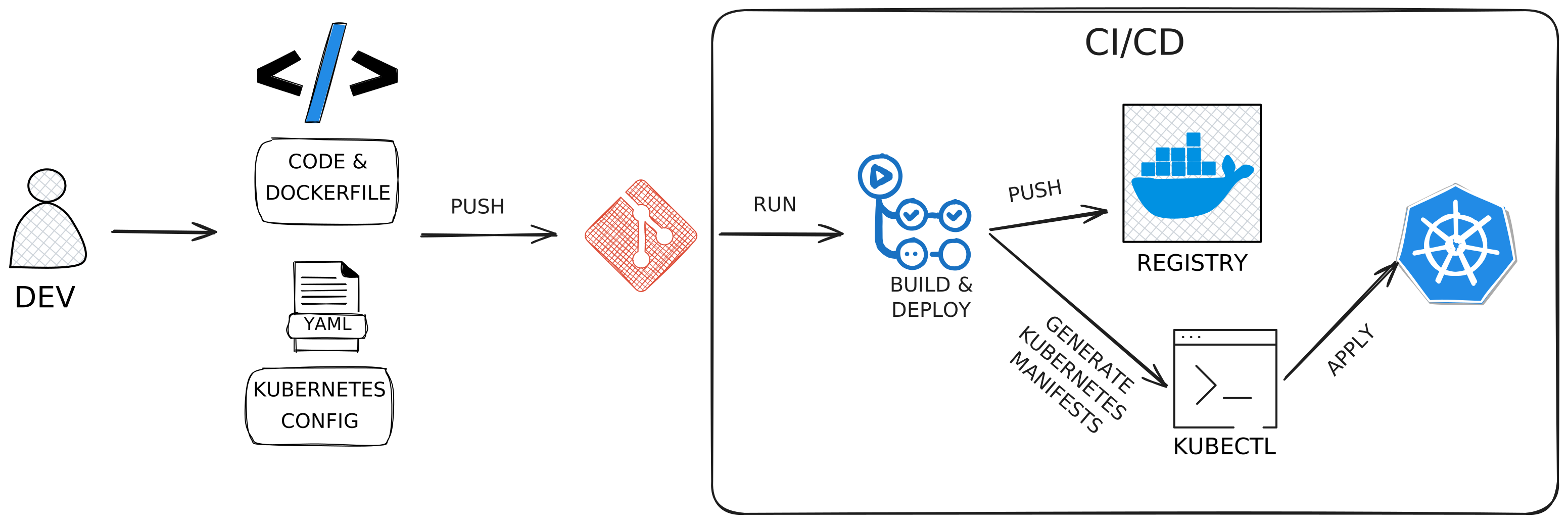
Traditional CI/CD
The Push Model
Problems:
- ✗ No single source of truth (state lives in cluster)
- ✗ No audit trail
- ✗ State drift
- ✗ "What's running now?" → Have to query cluster or review past CI pipelines
- ✗ Difficult rollbacks
GitOps
The Pull Model
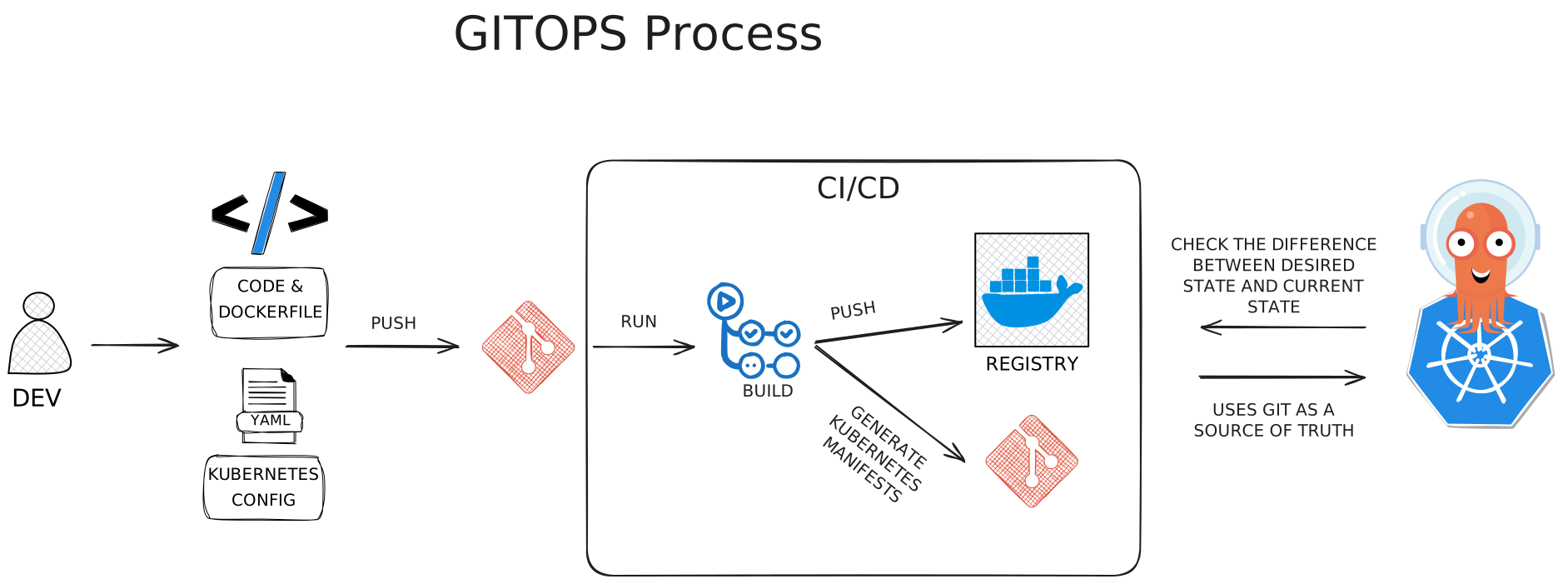
GitOps
The Pull Model
Key Difference:
GitOps operator pulls from Git and reconciles cluster
GitOps
The Pull Model
Core Principles:
- Declarative - What you want, not how
- Git as Source of Truth - All desired state in Git
- Automated Reconciliation - Operator syncs cluster to Git
- Self-Healing - Drift automatically corrected
GitOps
The Pull Model
Benefits:
- ✓ Complete audit trail | ✓ Easy rollbacks
- ✓ Single source of truth | ✓ No manual intervention
- ✓ Disaster recovery (rebuild from Git)
GitOps
The Pull Model
Benefits:
- ✓ Complete audit trail | ✓ Easy rollbacks
- ✓ Single source of truth | ✓ No manual intervention
- ✓ Disaster recovery (rebuild from Git)
The Multi-Environment Challenge
Simple GitOps Works But...
Questions we still need to answer:
- How to promote through dev → staging → production?
- How to verify each environment before promotion?
- How to coordinate multi-service deployments?
- When should staging get new versions?
- Who approves production deployments?
- How to handle rollbacks across environments?
The Multi-Environment Challenge
Simple GitOps Works But...
Questions we still need to answer:
- How to promote through dev → staging → production?
- How to verify each environment before promotion?
- How to coordinate multi-service deployments?
- When should staging get new versions?
- Who approves production deployments?
- How to handle rollbacks across environments?
The Gap: Simple GitOps doesn't handle promotion
We need something more...
Full GitOps with Promotion
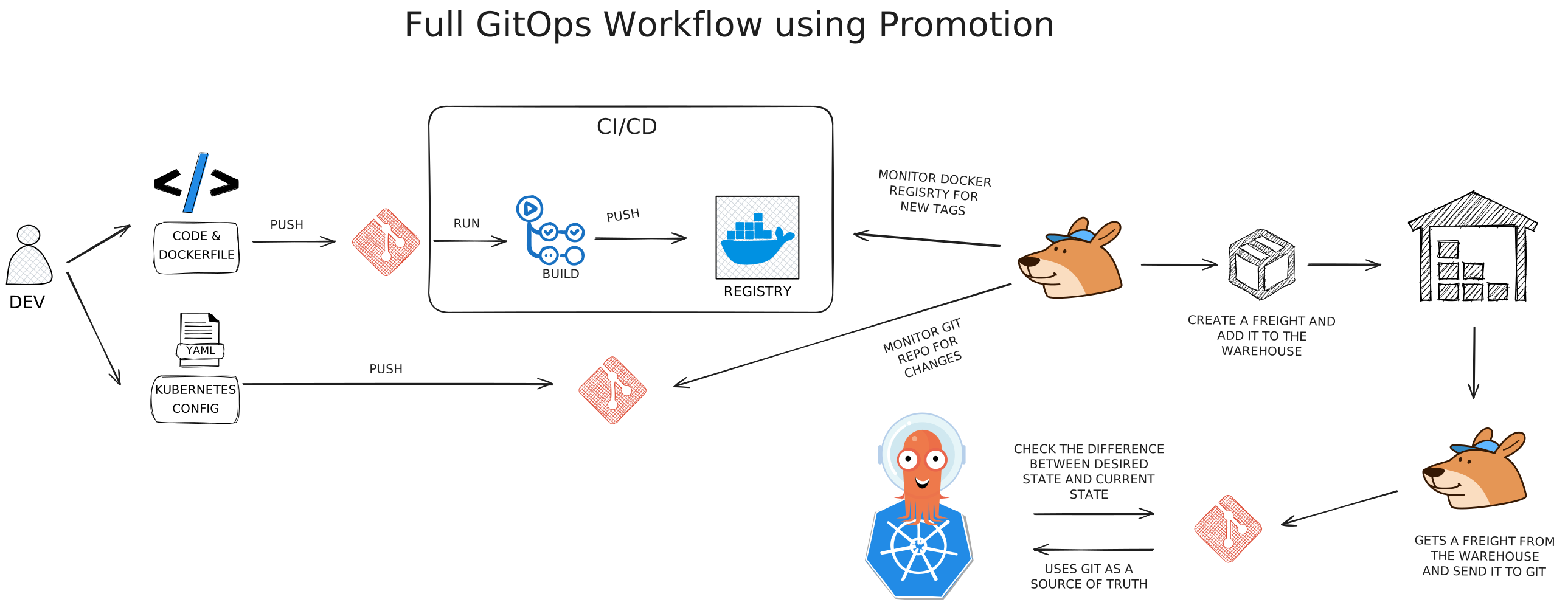
Full GitOps with Promotion
Additional Components:
- Freight system - Versioned artifacts package
- Environment promotion - Automated workflows
- Verification gates - Tests between environments
- Approval workflows - Human gates where needed
Full GitOps with Promotion
Freight Concept:
Container image + config + dependencies promoted as a unit
Promotion Flow:
- CI builds docker image
- Tooling creates a freight in the warehouse
- Auto-deploy to staging
- Verify & approve
- Promote to Production
Example Tools: Kargo, Argo Rollouts, ArgoCD
Promotion Benefits
Risk Reduction:
- ✓ Each environment verifies before promotion
- ✓ Automated testing gates
- ✓ Approval workflows for production
- ✓ Same validated image promotes to production
Promotion Benefits
Visibility:
- ✓ Know exactly what's in each environment
- ✓ Track promotion history
- ✓ Clear deployment status
Promotion Benefits
Coordination:
- ✓ Multi-service deployments coordinated
- ✓ Version compatibility enforced
- ✓ Configuration changes tracked
Tying It All Together
The Complete Picture:
- Create tagged release (v2.1.0) with full documentation
- CI builds Docker image from tag
- Tooling creates a freight in the warehouse
- Freight promoted through environments with verification
- GitOps maintains desired state
- Can roll forward or point to previous tag
Tying It All Together
Everything works together:
- Intentional releases → Clear deployments
- Semantic versioning → Risk communication
- Expand-Contract → Safe DB changes
- GitOps → Automated, auditable deployments
- Progressive delivery → Verified promotions
Hotfix & Emergency Releases
The process still applies under pressure
Emergencies are exactly when undocumented, unreviewed changes cause the most damage
Hotfix & Emergency Releases
The fix always lands on main first
Guarantees the fix is part of mainline history and won't be lost in future releases
If main has unreleased changes:
- Merge fix to
mainnormally - Branch from the broken tag:
hotfix/v1.3.1 - Cherry-pick the fix onto the hotfix branch
- Tag the hotfix release (
v1.3.1) - Promote through Staging (expedited, not skipped)
Hotfix & Emergency Releases
Hotfixes are always PATCH releases
If the fix requires a migration or breaking change, it needs a more considered approach, not an emergency patch
Can be expedited:
- Staging validation (focus on the fix)
- Production approval (immediate)
Never skip:
- Tagging
- Release documentation
- Staging promotion
Key Principles to Remember
- Deploy from tags, not commits - Intentional decisions
- Version numbers communicate risk - PATCH/MINOR/MAJOR means something
- Database rollbacks are myths - Plan forward-only
- Expand-Contract for breaking changes - Overlap old and new
- Git as source of truth - Pull, don't push
- Verify before promoting - Confidence through environments